Sign in to Loot Audio
Access your downloads, purchases and more
Access your downloads, purchases and more

Pulse is a revolutionary new downloader offering blazing fast speeds and powerful control over your libraries. Loot Audio uses Pulse to power some of our downloads and to make managing your libraries more efficient for you.
After your purchase we will send you a unique code (you will also find the code in your account). Use the code with Pulse to power your download and installation. More information about Pulse can be found here.
What are Credits?
You earn Credits every time you purchase a product from Loot Audio. 3% of your order is added to your account in the form of Credits.
Use Credits for money off future orders or convert them to Sample Credits to download samples from the Sounds section of the site.
The New Paradigm for Dynamic Processing
$169.12
Earn 375







Land A Punch - Hit your listeners with precise impact. Create depth by placing tracks up front, or at a distance.
Keep the Body in Shape - Usher tracks to their right place in the mix. Make instruments solid as a rock, or shake the dust off and make it groove.
Swipe the Floor - Dial in just the right amount of detail and reverb. Clean up unwanted noise and make your mix shine.
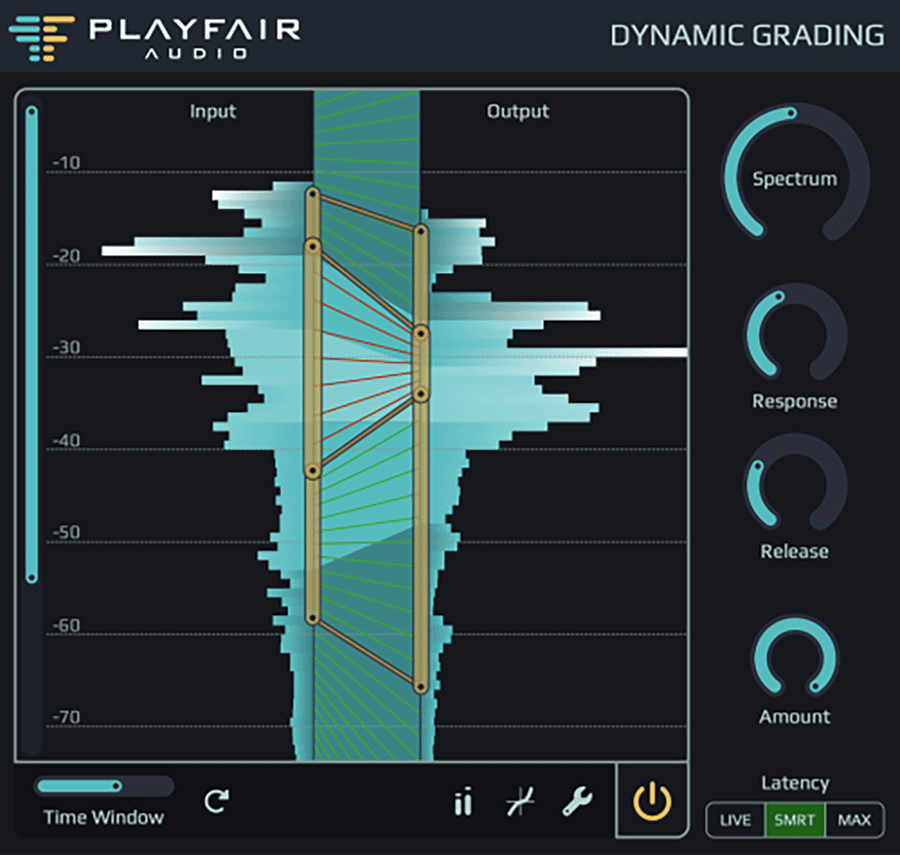
Dynamic Grading is centered around dynamic histograms. Imagine a really fast-moving level meter, and a superhuman statistician sitting in front of it and gathering statistics of the readings over time.
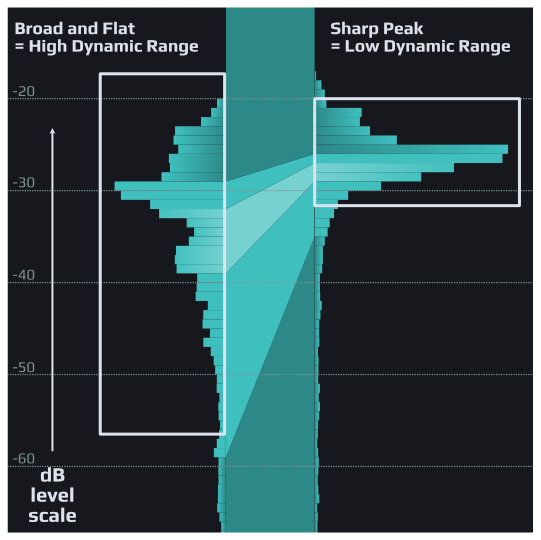
This kind of graph tells us a lot about audio dynamics. It reveals the dynamic range (the highest and lowest readings) as well which loudness regions are most prominent and how much perceived loudness varies (= how dynamic it is).
A sharp peak in the graph hints at rather static audio with low dynamic range, while a broad and flat shape means there is a lot of dynamic variation.
Remember threshold and ratio knobs? Having to use those when adjusting compressors or expanders was fun while it lasted. But we can do better!
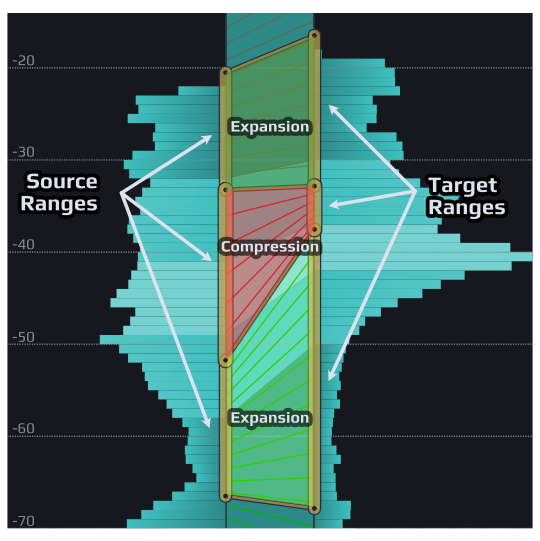
Just specify where the relevant dynamic ranges are in the source audio (left markers), and where you want them to be in the result (right markers). Dynamic histograms guide you to quickly find the sweet spots.
When the target range is narrower than the corresponding source range, this part of the dynamic range will be compressed. If it is wider, it’s an expansion. Simple and seamless!
In Dynamic Grading, you work independently with the three fundamental dynamic regions.
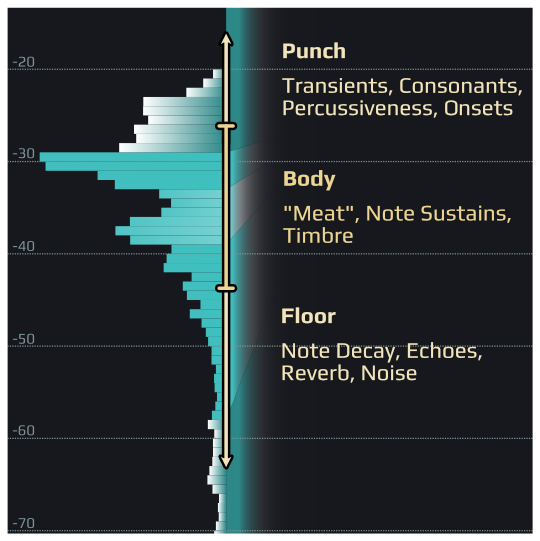
The body range is where the “meat” of the signal is, such as vocal timbre or note sustains of instruments.
Right above, the punch range is home to transients, consonants, percussive elements and note onsets.
Finally, the floor contains elements like late decay of instrument notes, reverb, or background noise. Think of it as the “space between notes”.
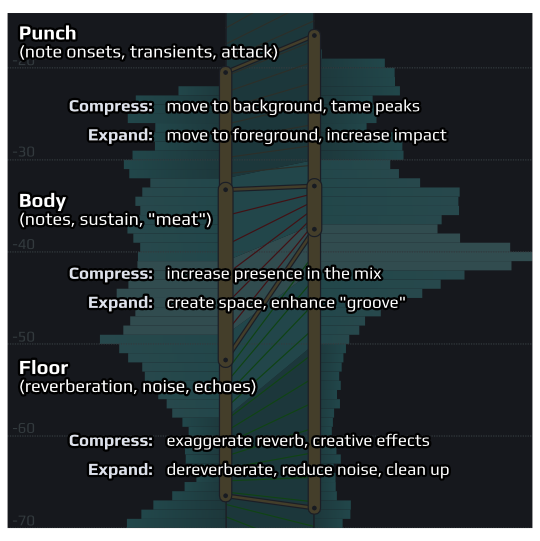
Tightly control depth perception by adjusting the punch. Compress to get smoother onsets and a sense of distance, expand to increase impact and position a track front and center.
Compress the body to make the most prominent features sit firmly in the mix. Create more space by expanding the body when a track totally clogs your mix bus.
Adjust reverberation and background noise with the floor range. Expand to smoothly reduce reverb or noise and gently clean up a recording. Or squeeze it for weird and fascinating artistic effects.
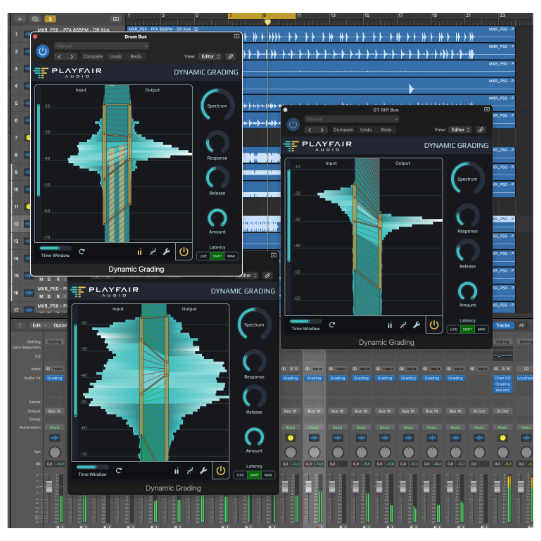
Ready to fully embrace the Dynamic Grading Workflow? Drop it on every track and leave all faders at 0 dB.
That way you can basically paint your mix by placing individual tracks in the dynamic range, right where they belong.
We don’t say you should mix without even listening, but well, with Dynamic Grading you probably could…
Download Dynamic Grading for your operating system. The fully functioning trial license is free for 14 days.
An iLok account is required to activate the trial and/or full version.
macOS - System Requirements
Download macOS .dmg