Sign in to Loot Audio
Access your downloads, purchases and more
Access your downloads, purchases and more

Pulse is a revolutionary new downloader offering blazing fast speeds and powerful control over your libraries. Loot Audio uses Pulse to power some of our downloads and to make managing your libraries more efficient for you.
After your purchase we will send you a unique code (you will also find the code in your account). Use the code with Pulse to power your download and installation. More information about Pulse can be found here.
What are Credits?
You earn Credits every time you purchase a product from Loot Audio. 3% of your order is added to your account in the form of Credits.
Use Credits for money off future orders or convert them to Sample Credits to download samples from the Sounds section of the site.
Supersize Your Low End
$69.00
Earn 180







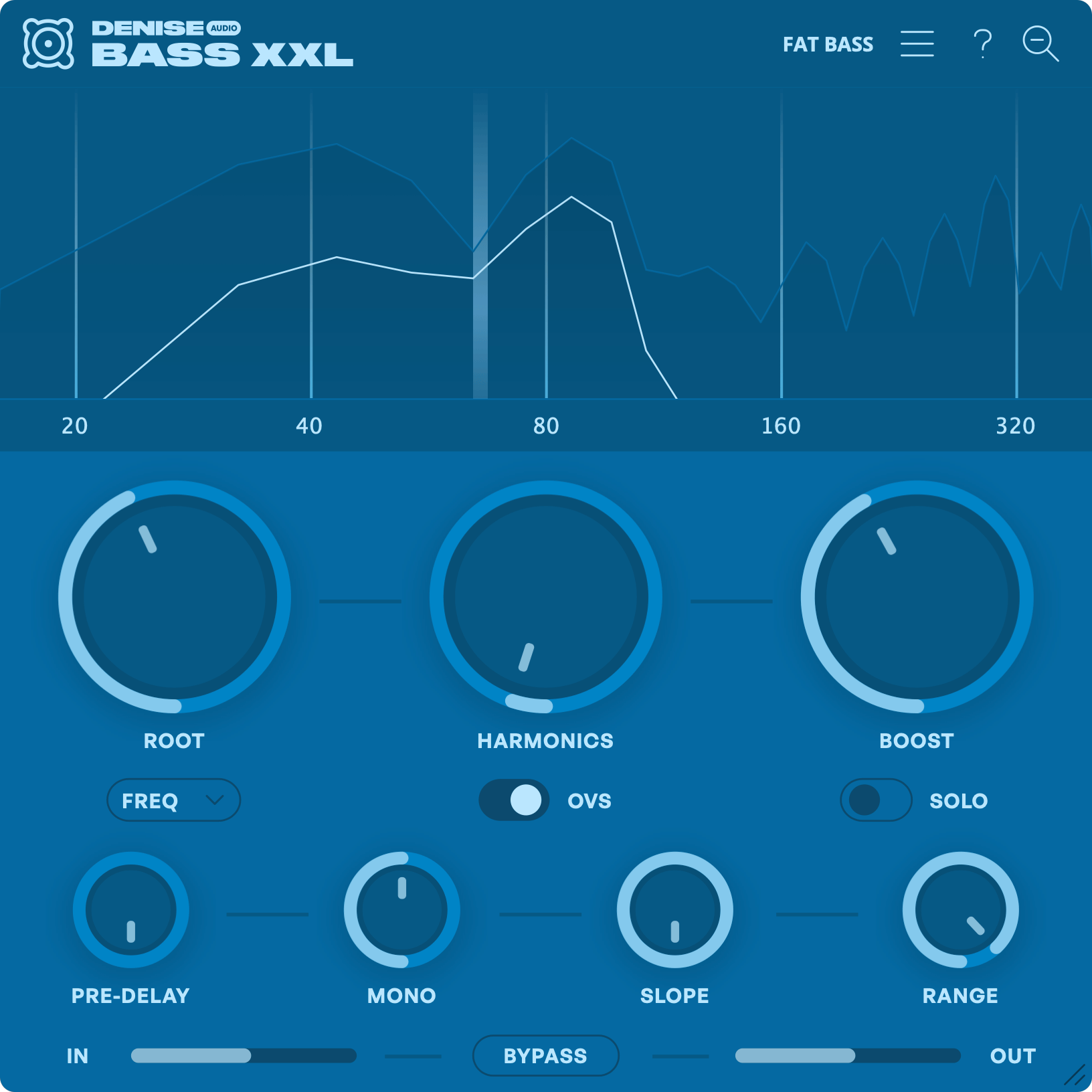
Tooltips: Get a quick explanation of features, like this one!
Version Number: Quickly identify the version of Bass XXL you’re running by hovering over the Denise Audio logo.
Preset Browser: Save and browse your favorite presets. Includes factory and user made presets.
Zoom/Magnifying Glass: Toggle between a full spectrum view and a low frequency specific view.
Spectrum Graph: Analyze your signal in real time. See exactly what Bass XXL is adding to your signal.
Harmonics: Increase the intensity of the harmonics generated.
Root: Hone in on the exact frequency or musical note that you wish to enhance.
- Frequency: Set your bass according to an exact Hz - kHz.
- Note: Set your bass relative to a musical tone.
- Midi: Have your bass follow incoming MIDI notes in real-time.
Boost: Blends in the harmonic signal. Does not affect the dry signal.
Oversampling: Prevents aliasing in the higher frequencies.
Solo: Toggle to hear ONLY Bass XXL's harmonics.
Pre-Delay: Adds a delay between the dry signal and the harmonics. This is useful for preserving the original transient.
Mono: Turn this up to ensure you have a strong, mono-compatible low-end at all times – even if your source signal is stereo.
Slope: Changes the frequency distribution of the introduced harmonics from smoother to more focused.
Range: Determines how many octaves the harmonics are generated over. Essentially filtering out higher frequencies and focusing the effect in the lower parts of the spectrum.
Bypass: Toggle to bypass the plugin.
In: Determines the input level of the plugin.
Out: Determines the output level of the plugin.
Low-end harmonics are a powerful thing. So before you add them, you'll want to determine exactly where to focus. Bass XXL offers flexibility with three distinct modes:
Frequency
Manually select your desired frequency to add punch and heft to kick drums, percussion, one shots, and mix groups.
Root Note
For melodic instruments like synth or bass guitar, choose a root note to ensure that Bass XXL’s harmonic enhancements are in key with your track.
Midi
If you want Bass XXL to update its focus in accordance with tonal movements in your track, you can control the plugin via midi (for instance by linking it to your bass line).
Bass XXL makes use of a proprietary algorithm designed to supersize the low end. The plugin accomplishes this by generating additional harmonics that are actually above the bass frequency you want to enhance.
This concept takes advantage of a psychoacoustic phenomenon that causes our brains to interpret sub bass audio largely based on its harmonics more so than the lowest sounds being produced. Even in the absence of sub bass frequencies, we fill in the blanks and perceive the bass as long as the proper harmonics are present.
With so many of today’s earbuds and small speakers unable to generate satisfying low end, Bass XXL comes to the rescue by enhancing your bass with fat and beefy harmonics that can be felt and heard.
Based on the cult success of our Bass XL V1, we wanted to raise the bar with Bass XXL and create the 'be-all-end-all' bass enhancement tool. Use the plugin to beef up bass lines, kick drums, toms, drum groups, or even entire mixes.
Silky harmonics made for bass
Bass XXL’s harmonics algorithm is custom developed for low-end duties. Unlike a sub-synth, it generates its harmonics entirely from your dry track, resulting in a natural and organic bass enhancement that blends perfectly. The algorithm combines the smoothness of analog saturation with digital precision and oversampling. Furthermore, we've eliminated the phasing issues that sometimes occur with this type of effect.
Relieving the pain
One of the biggest pain points in professional mixing is to get a defined low end that translates well to all listening devices. Bass XXL doesn't offer any miracle cure but it relieves a big part of the headache and makes your job a whole lot easier.
So what is this thing, then? To address some of the confusion, it is not a sub-synth, but a highly specialized effect plugin that takes your dry track and carefully generates harmonics in a contained frequency area, then blends these harmonics into your track. The way Bass XXL creates its harmonics takes advantage of a psychoacoustic phenomenon, which makes our brain perceive more low end, even if there isn't any. This is handy for achieving a powerful bass presence on big and small speakers alike.
With Bass XXL, we have taken this concept as far as we possibly could, giving you extra versatility and the highest sound quality. The plugin is CPU light and doesn't introduce any phasing issues or latency. Unlike a sub synth, Bass XXL's harmonics are derived entirely from your original track. This results in a natural bass enhancement that feels more like 'adding some extra magic' than layering another instrument. Grab the demo and try it for yourself!
Harmonics
Use the Harmonics knob to set the intensity of the harmonic generation. Part of Bass XXL's magic is in the musical way it processes your dry track to generate these harmonics. So don't be afraid to turn it up. Engage oversampling for even higher quality.
Boost
The Boost knob mixes in the harmonics in parallel – i.e. without touching your dry track. This ensures that you can add harmonics to your low end without messing with its original placement in your mix. Engage Solo mode to listen to the harmonics in isolation.
See what can't be heard
Gain clinical insight into your track’s bass frequencies with a spectrogram zoomed in on just the low end, displaying Bass XXL’s harmonics and your unaffected dry signal separately. To get a visual reference of the full spectrum, click the magnifying glass icon in the top panel.
Pre-delay
Lets you preserve the transient of your dry signal by adding a delay to the harmonics.
Mono
While you’ll generally want your bass to be front and center in your mix, Bass XXL’s mono knob gives you the flexibility to preserve a track’s stereo image.
Slope
Use the Slope knob to shape the harmonic signal by setting the curve at which Bass XXL’s frequencies roll off. Use a gradual slope for a smoother, more analog feel, or go steeper for a more surgical enhancement.
Range
Set how many octaves Bass XXL’s harmonics will be generated over. High range settings will make the effect more audible, while lower settings will keep the effect more subtle.
Windows: Windows 10 or newer (64-bit)
Mac: macOS 10.11 or newer (64-bit) including native Apple Silicon
Plugin Formats: VST, VST3, AU, AAX (64-bit only)