Sign in to Loot Audio
Access your downloads, purchases and more
Access your downloads, purchases and more

Pulse is a revolutionary new downloader offering blazing fast speeds and powerful control over your libraries. Loot Audio uses Pulse to power some of our downloads and to make managing your libraries more efficient for you.
After your purchase we will send you a unique code (you will also find the code in your account). Use the code with Pulse to power your download and installation. More information about Pulse can be found here.
What are Credits?
You earn Credits every time you purchase a product from Loot Audio. 3% of your order is added to your account in the form of Credits.
Use Credits for money off future orders or convert them to Sample Credits to download samples from the Sounds section of the site.
The Creative Rhythm Companion
$19.99
Earn 54







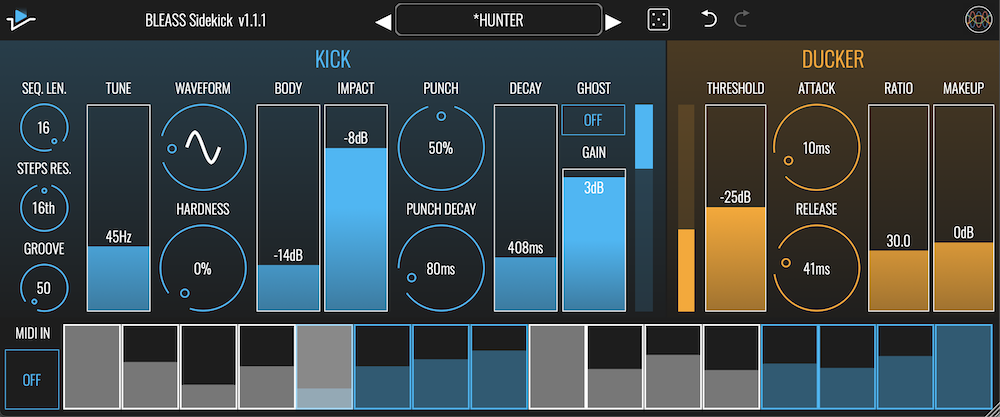
KICK SECTION
TUNE: Sets the pitch of the kick drum sound, from 20Hz to 100Hz.
WAVEFORM: Selects the waveform that the kick synth will use. The waveform can be morphed smoothly from sine wave to triangle wave.
HARDNESS: Adds overdrive to the kick sound, giving it a harder, brighter edge, and emphasising the pitched part of the sound.
BODY: Mix in a second oscillator tuned an octave above the first, giving a thicker, fuller sound.
IMPACT: Accentuates the initial attack portion of the kick sound, giving more thump and impact.
PUNCH: Adds a resonant filter sweep to the beginning of the kick sound.
PUNCH DECAY: Sets the duration of the Punch filter sweep. Fast settings add a short, punchy transient; longer settings create noticeable filter sweep effects.
DECAY: Controls the overall decay time of the kick drum sound. Use low settings for short, ‘clicky’ kicks; use longer settings for booming and pitched sounds.
GHOST: When enabled, removes the kick sound from the plugin’s output mix. The kick sound can be routed in a different channel thanks to Multi-bus output (iOS: see tutorial) or Multi-out compatible DAWs (Desktop: see tutorial).
GAIN: Sets the output volume level of the kick drum synth.
SEQUENCER SECTION
SEQ. LEN.: Specifies the number of steps in the sequence, from 4 to 16.
STEPS RES.: Sets the length of each step as a note length.
GROOVE: Adds swing timing to the sequencer for a groovier result.
MIDI IN: When enabled, allows you to trigger the kick sequencer from a controller or from a MIDI track within your DAW. Any pattern programmed into the plugin will still play too.
STEP GRID: Shows the steps that will, and will not, trigger the kick synth. The velocity (or loudness) of the trigger is set by dragging up or down within a step’s cell. The alternating grey and blue colour-coding helps you to distinguish each group of four steps.
DUCKER SECTION
THRESHOLD: Sets the sensitivity of the ducker effect. When the kick’s volume level exceeds the threshold, a compression process will be applied to the audio passing through the plugin, reducing its volume.
ATTACK: Determines how long it takes for the ducker’s compressor to reach full compression once the threshold has been exceeded.
RELEASE: Determines how long it takes for the ducker’s compressor to return to no compression when the kick synth’s signal falls back below the threshold.
RATIO: Controls how much gain reduction will be applied to the plugin’s signal. Works in conjunction with the Threshold control to determine the overall strength of the ducking effect.
MAKEUP: Compensates for any loss of overall signal level that results from the ducking process.
PC:
Mac:
Format: