SAMPLE
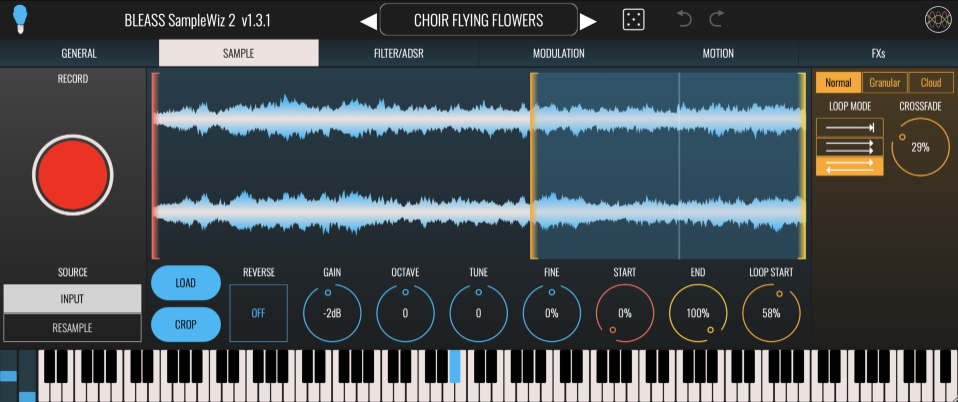
RECORD (iOS + most Desktop DAWs): Instantly start recording a new sound. When running the standalone app, use the SOURCE options to choose whether to record from your device’s active mic, or from SampleWiz 2’s output (I.E. resampling). When running as an AUv3 FX plugin, SampleWiz 2 records audio from the track or buss it is assigned to. When used as a VST3, route the output signal from another track into SampleWiz 2 VST3.
LOAD SAMPLE / LOAD: Load an existing sample or audio recording from the file system.
On desktop, you can also drag & drop your audio file (under <1 minute / .wav or .aiff)
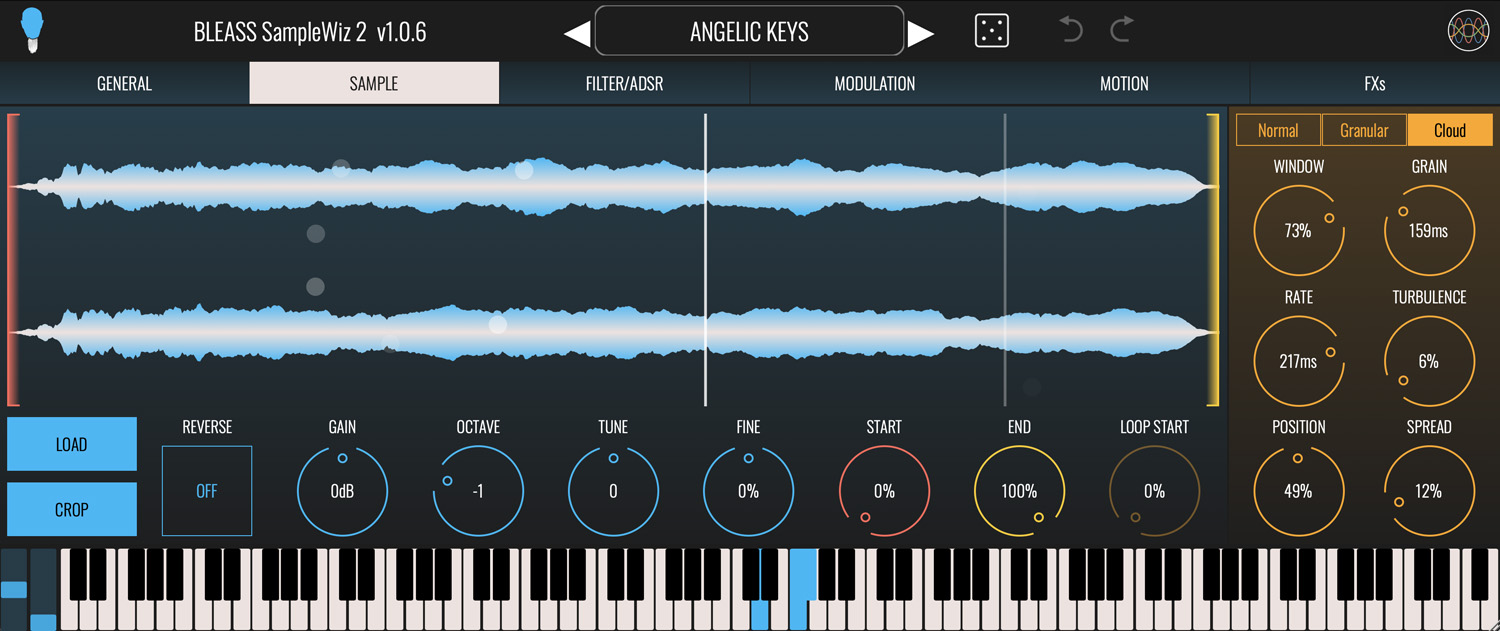
SAMPLE WAVEFORM: Tap/click and drag on the red marker to set the sample start position, and on the yellow marker to set the end point. Position the amber marker to set the loop start point.
iOS Only: Trigger and play the sample by tapping and dragging on the waveform view. Enable the Y PITCH button to control the pitch freely with the vertical position of your finger; also enable the SNAP button to have the pitch control lock to precise semitones.
CROP: Crops the sample to the current start and end points. Any audio that lies outside of those start and end points is discarded.
REVERSE: Reverses the direction of the sample.
GAIN: Adjusts the volume level of the sample
OCTAVE: Transposes the sample by octaves, with a range of +/- 2 octaves.
TUNE: Transposes the sample by semitones, with a range of +/- 12 semitones.
FINE: Transposes the sample by cents (I.E. 100th of a tone) with a range of +/- 50 cents.
START: Sets the sample start position.
END: Sets the sample end position.
LOOP START: Sets the sample’s loop start position.
LOOP MODE: Sets the sample’s loop mode.
- Play the sample once from start to end.
- Play the sample from start to end, then cycle continuously from loop start to sample end.
- Play the sample from start, then cycle back and forth between the sample end and loop start points.
NORMAL
Use this mode for standard sample playback.
CROSSFADE: Sets the length of crossfade applied during looping.
GRANULAR
Enables the Granular sampler engine. A “grain” is a small snippet taken from the source sample. Changing the grain sampling position changes the timbre that is produced, as does changing the size of the grains.
GRAIN: Sets the size/length of the grain.
SPEED: Sets the speed at which the grain sampling position moves through the sample. Use negative values to have the grain sampling position move in reverse, from sample end to sample start.
TURBULENCE: Adds a constantly changing random offset to the grain sampling position.
SPREAD: Controls how grain sampling is distributed across the left and right channels of the source sample. At 0% grains are taken from left and right channels evenly, resulting in a monaural sound. As the SPREAD is increased, grains are increasingly weighted towards left or right channels of the source sample. At 100% each grain will be taken from either the left or right channel of the source sample.
CLOUD
Enables the Cloud sampler engine. Like the Granular engine, the Cloud sampler engine takes small grains of audio from the source sample. Rather than stay static or simply move across the source sample, the Cloud engine oscillates the grain sampling position back-and-forth across a section of the source sample.
WINDOW: Sets the size of the grain sampling position’s oscillations as a percentage of the overall sample length.
GRAIN: Sets the size/length of the grain.
RATE: Sets the speed at which the grain sampling position will oscillate within the window.
TURBULENCE: Adds a constantly changing random offset to the grain sampling position.
POSITION: Sets the central location of the grain sampling position, as a percentage of the overall sample length.
SPREAD: Controls how grain sampling is distributed across the left and right channels of the source sample. At 0% grains are taken from left and right channels evenly, resulting in a monaural sound. As the SPREAD is increased, grains are increasingly weighted towards left or right channels of the source sample. At 100% each grain will be taken from either the left or right channel of the source sample.