




🚨 Free product included with qualifying orders πŸš¨β˜…πŸš¨ Free product included with qualifying orders πŸš¨β˜…πŸš¨ Free product included with qualifying orders πŸš¨β˜…πŸš¨ Free product included with qualifying orders πŸš¨β˜…πŸš¨ Free product included with qualifying orders πŸš¨β˜…πŸš¨ Free product included with qualifying orders πŸš¨β˜…πŸš¨ Free product included with qualifying orders πŸš¨β˜…πŸš¨ Free product included with qualifying orders πŸš¨β˜…πŸš¨ Free product included with qualifying orders πŸš¨β˜…πŸš¨ Free product included with qualifying orders πŸš¨β˜…
Theme

Forthcoming Events

No forthcoming events scheduled.


Expired Events

Summer Sale Ended: 14 Jul 2026
May 2026 Deals Ended: 31 May 2026

Live Event

Active

Heatwave Sale 2026

Feel The Heat! From industry-leading plugins and Kontakt instruments to essential sample packs and cinematic sound design libraries.

Ends In
17d 16h 15m 11s
VIEW ALL DEALS

0

0

Change country:

We use cookies

We and selected 3rd parties use cookies or similar technologies as specified in our Cookie Policy

You can consent to the use of such technologies by using the "Accept" button

Manage cookies

Essential
Essential cookies required for business process and to make the website usable by enabling basic functions. (always active)
Marketing
Marketing cookies are used to serve personalised ads and analyse performance.

Plugin

Plugin Effects

Bleass

BLEASS Phaser

All-around Phasing Effect

Bleass - BLEASS Phaser Plugins & FX Software GUI Artwork

$19.99

Earn 54

Digital Download

0

Instant Access Direct download
100% Genuine Official license
Flexible Payments PayPal, Card or Wallet
Support Here to help
Guaranteed Safe & Secure Checkout
Visa Mastercard American Express Apple Pay Google Pay Klarna

Product Overview

More subtle than flanging and more colourful than chorus, phasing has long been a go-to effect for guitarists, keyboardists, vocalists and bassists who want to inject a touch of other-worldly character into their sound. No effects collection is complete without a phaser!

BLEASS Phaser delivers a comprehensive and highly versatile phasing effect. Whether you’re looking for gentle movement, resonant swirls, or stunning atmospheric soundscapes, BLEASS Phaser can do it all.

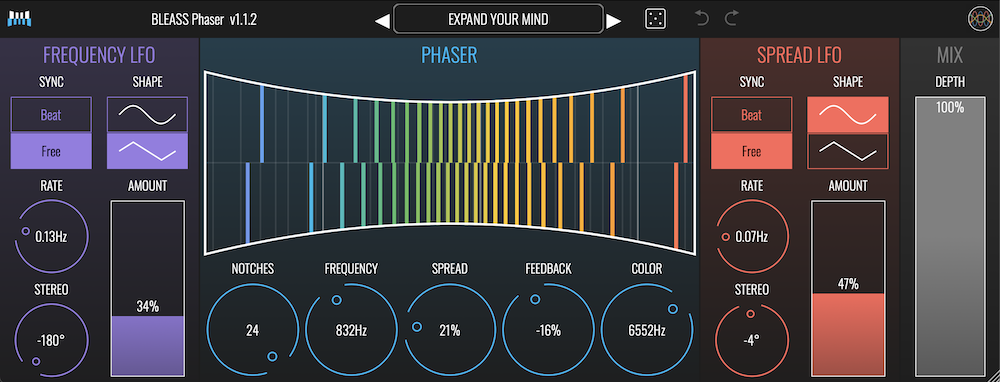
The plugin’s interface is dominated by a colourful and captivating visualisation that illustrates the notch frequencies that create the phasing effect. This detailed and intuitive display, coupled with BLEASS’ trademark tactile interface design, demystifies the entire phasing process, and makes working with BLEASS Phaser a joy.

Phasers use all-pass filters to create frequency-specific phase changes within a sound. When this sound is overlaid on the original unprocessed sound, it creates notch filters at the cutoff frequencies of the all-pass filters. By using multiple all-pass filters, with frequencies that spread from a “centre” frequency determined by the first all-pass filter, a complex comb filtering effect is generated. Adding modulation to the filter frequencies leads to the characteristic sweeping, whooshing sound that phasing is known for.

BLEASS Phaser has two LFO modulation sources. The first modulates the notch filter cutoff frequencies, the second modulates the spread of notch frequencies around the initial centre frequency. This allows the plugin to create classic repetitive phasing effects, as well as complex, ever-shifting notch patterns that add tons of sonic interest to a part.With BLEASS Phaser in your collection, you will never need another phaser!

Features

  • UP TO 24 NOTCHES: Provides an extensive range for creating complex phasing effects, from subtle to extreme.
  • DUAL LFOs: Allows modulation of both frequency and spread, offering dynamic, evolving phaser sounds.
  • STEREO CONTROL: Includes phase offset and stereo spread adjustments for crafting wide, immersive stereo phasing effects.
  • FEEDBACK AND COLOR: Enhances phasing textures with resonance control and high-frequency damping, adding character to the sound.
  • INTUITIVE UI: Features a clear visualization of notches, making it easy to see and adjust the phasing effect's impact.

DETAILS

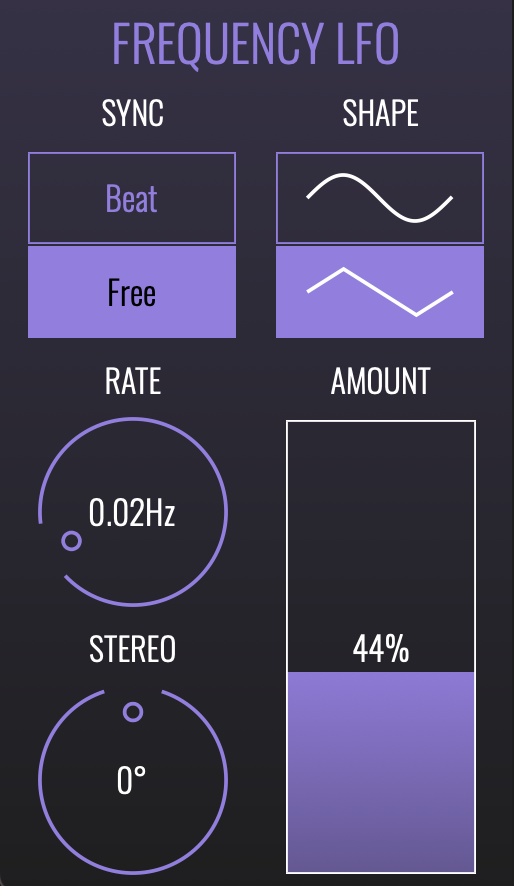
FREQUENCY LFO
LFO that modulates the center frequency of the phaser

SYNC: Select BEAT mode to synchronise the LFO to your DAW’s timing and tempo. Use FREE mode to have the LFO run freely at a specific rate.

RATE: Sets the time taken for the LFO to complete one cycle. When Sync is in BEAT mode, the Rate is set as a fraction of a beat. When Sync is in FREE mode, the Rate is set in Hz (I.E. number of cycles per second).

SHAPE: Select whether the LFO will use a sine wave (upper button) or triangle wave (lower button).

AMOUNT: Sets the magnitude, or strength, of the LFO’s effect on the phaser’s centre frequency or spread.

STEREO: Creates a phase offset between the left and right channels of the LFO’s waveform. When set to 0°, both channels modulate together in lock-step. Increasing or decreasing the Phase introduces an ever greater offset between the channels until, at 180°, they are fully inverted from each other (that is, the left channel will be rising whilst the right channel is falling, and vice-versa).
 

PHASER SECTION

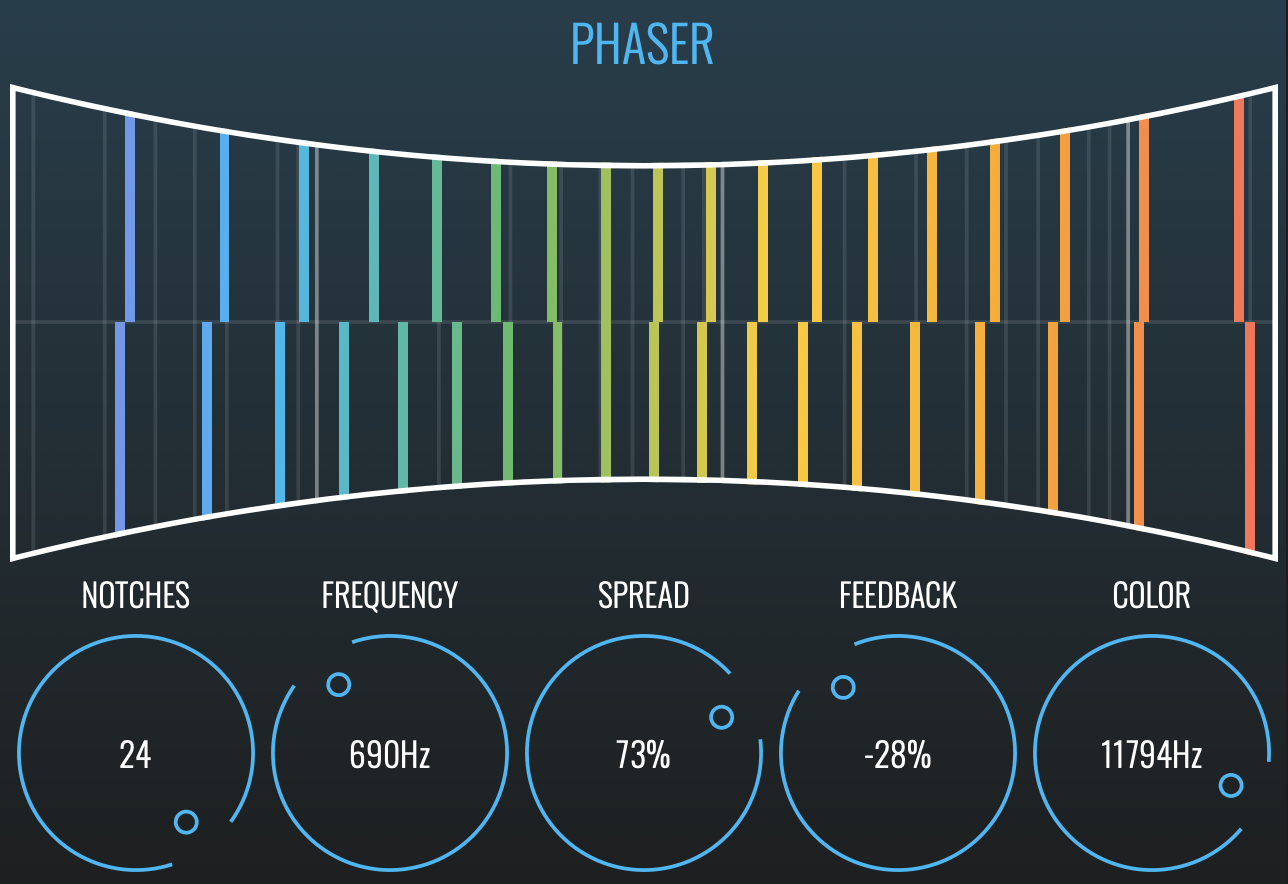
NOTCHES: Determines the number of notch filters the phaser will use. Another way of thinking of this is as the number of “teeth” in the comb filtering effect the plugin creates. Higher values result in a more complex and pronounced result.

FREQUENCY: Sets the centre frequency of the phaser. Notches are distributed evenly around this centre frequency.

SPREAD: Determines the frequency range across which the notch filters are distributed. Another way of thinking of this is as the gap between the “teeth” in the comb filtering effect the plugin creates.

FEEDBACK: Determines how strongly the notch filters are fed back on themselves. This introduces resonance into the notch filters, which in turn highlights and accentuates their sonic impact.

COLOR: Reduces high frequencies in the processed signal. Frequencies above the chosen setting are reduced.

VISUALISATION: The BLEASS Phaser visualisation provides an intuitive readout of the processor’s activity. Vertical bars represent the notch filters, whilst the horizontal position of these bars indicates the current frequency at which each filter is operating.


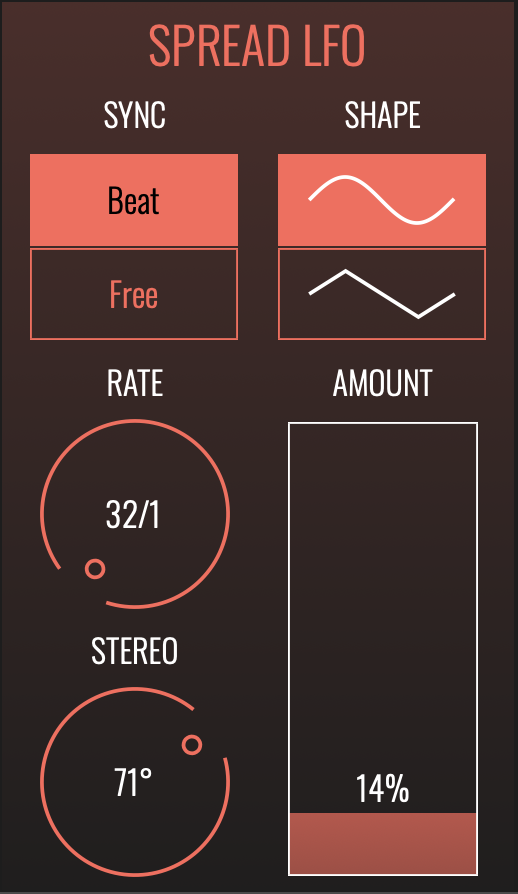
SPREAD LFO
modulates the distribution range of the phaser’s notch filters.

SYNC: Select BEAT mode to synchronise the LFO to your DAW’s timing and tempo. Use FREE mode to have the LFO run freely at a specific rate.

RATE: Sets the time taken for the LFO to complete one cycle. When Sync is in BEAT mode, the Rate is set as a fraction of a beat. When Sync is in FREE mode, the Rate is set in Hz (I.E. number of cycles per second).

SHAPE: Select whether the LFO will use a sine wave (upper button) or triangle wave (lower button).

AMOUNT: Sets the magnitude, or strength, of the LFO’s effect on the phaser’s centre frequency or spread.

STEREO: Creates a phase offset between the left and right channels of the LFO’s waveform. When set to 0°, both channels modulate together in lock-step. Increasing or decreasing the Phase introduces an ever greater offset between the channels until, at 180°, they are fully inverted from each other (that is, the left channel will be rising whilst the right channel is falling, and vice-versa).

Additional Information

MAC

  • OS X (macOS 10.11 and later (intel + native support for Apple Silicon))
  • Memory: 8 GB
  • Disk: 1 GB
  • Plugins: VST-3, AU, AAX

WINDOWS

  • Windows (Windows 10 and later)
  • Memory: 8 GB
  • Disk: 1 GB
  • Plugins: VST-3, AAX

Categories:

Phaser

Formats:

Plugin

Genres:

All Genres

Tags:

Plugin

Discover More

View All Events

BROWSE ALL

Happening Now

View Heatwave Sale 2026

SHOP LIVE EVENT
Your Playlist CLEAR
Your playlist is currently empty. Visit a product page and add some tracks to your playlist
Audio Player

0:00
0:00